Testing Basler GMSL cameras with the Basler GMSL Dev Kit and a Jetson Orin Nano Dev Kit
2 Basler GMSL Ace cameras running full frame @ ~18FPS – so far so good! These GMSL cameras run hot though, much hotter than their USB cousins!
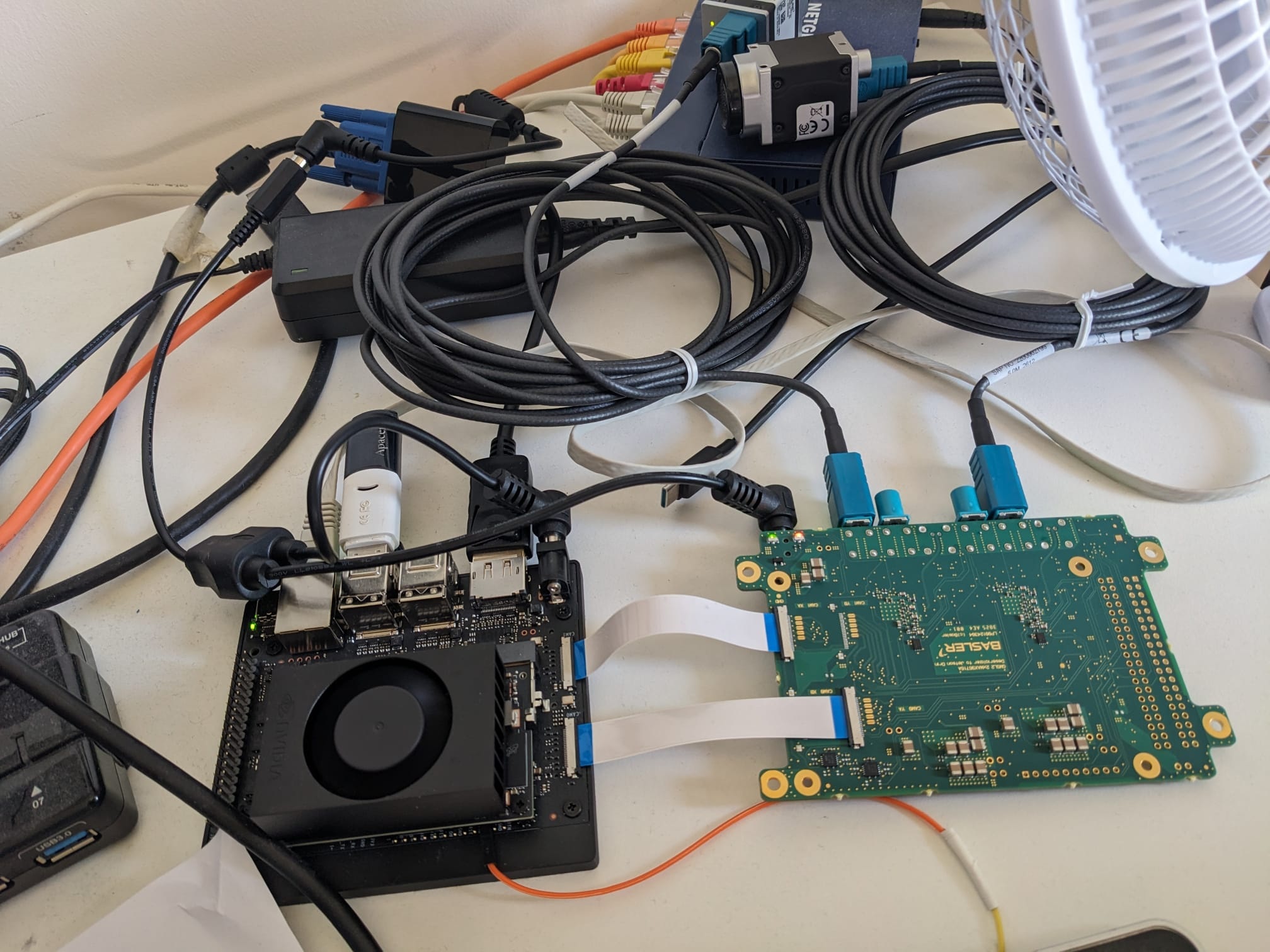

2 Basler GMSL Ace cameras running full frame @ ~18FPS – so far so good! These GMSL cameras run hot though, much hotter than their USB cousins!
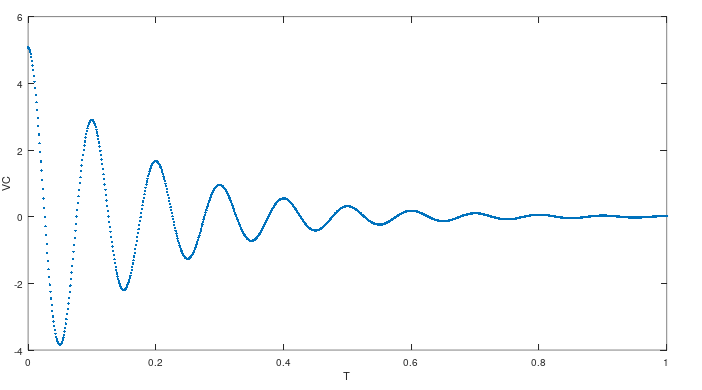
Over Christmas I started thinking about LC Tank Oscillators, especially as used on early Spark-gap radio transmitters. For no particular reason (except for fun) I decided to try to simulate simple LC and LCR oscillators from first principles in Rust. The simulations worked out quite well but need a bit more work as they are unstable at higher frequencies (I couldn’t achieve middle C!)
The Jetson Orin AGX has two Hardware JPEG Encoder blocks which in theory will allow you to encode images to JPEG much faster than using the CPU alone – as usual the reality is a little more complicated than the data-sheet might suggest!
The aim was to test and time the encoding of 24Bit RGB images in host memory to JPEG then back to host memory and compare the results with libjpeg-turbo.
For images up to about 1080p there is no real difference in encoding times, for larger images of 5328×3040 the hardware encoders were about 30% faster, which isn’t an earth shaking speedup, but it also reduces CPU load by about 50% which may be advantageous if your code is already CPU bound! This also demonstrates how very fast libjpeg-turbo is!
For more details and the test code see jetson_orin_hardware_jpeg_test

Is it possible to have a PPS disciplined NTP server without a network reference clock or network connection?
While doing some camera synchronisation and timestamp testing, I setup a Raspberry Pi NTP server with PPS using an Adafruit GPS hat so that I could sync my cameras’ time to NTP, trigger them using the PPS signal, generate UTC timestamps and check the timestamps against the expected UTC second boundaries.
As part of this the question once again arose – Can I configure an NTP server with GPS time and PPS without having to configure a network reference clock along with the GPS and PPS sources? This was important as my test setup didn’t have access to an external network, and yet I wanted typical NTP offsets of < 100us.
Well with quite a bit of messing I finally got it working, at this stage there are lots of pages that detail how to setup a Pi as an NTP server with PPS, some mention that you must have a network reference and some mention that you don’t – I had to do a lot of digging and a lot of messing to get to the bottom of things.
Amusingly, NTP configuration is something that ChatGPT is simply terrible at – don’t use it for this, it will just waste your time!
I had lots of problems, but the 2 most persistent was:
For ages, I lurched between problems 1 and 2…
Eventually I got it working for my setup. The trick to get it working for me is that:
My working configuration:
tos mindist 0.500
# Local Clock
server 127.127.1.0
fudge 127.127.1.0 stratum 15
# GPS/NMEA Source from Hat
server 127.127.28.0 minpoll 4 maxpoll 4 prefer iburst
fudge 127.127.28.0 time1 0.000 refid GPS stratum 10
# PPS Source, stratum 0 and prefer
server 127.127.22.0 minpoll 4 maxpoll 4
fudge 127.127.22.0 refid PPS stratum 0 flag3 1 flag4 1 prefer
I deliberately left the time offset for the GPS source at 0.0 rather than trying to chase down the time packet offset so that I could see an “honest” offset value in the ntpq output:
 remote refid st t when poll reach delay offset jitter
==============================================================================
LOCAL(0) .LOCL. 15 l 58m 64 0 0.000 0.000 0.000
*SHM(0) .GPS. 10 l 16 16 377 0.000 -106.45 1.145
oPPS(0) .PPS. 0 l 15 16 377 0.000 -0.001 0.001
I decided to upgrade to Android Studio Electric Eel today in order to get WiFi pairing and debugging with my android phone – happily WiFi pairing now works, but unhappily my App refused to build anymore with Java version errors.
If when you run flutter doctor and get an error like this:

Take a look at this thread, linking from jbr to jre directories fixed it for me (windows 10), although I had to delete the empty C:\Program Files\Android\Android Studio\jre folder first!
From a CMD session with Admin privileges run:
mklink /D "jre" "jbr"
I have been looking into the possibility of using Flutter and Dart to implement a control GUI for a camera, the main target is a web app, I am looking at flutter as an alternative to web frameworks like React. The flutter platform is very impressive and Dart itself is a nice little language. Flutter promises that many platforms can be targeted with one code-base – iOS, Android, Windows, Mac and Web. Impressive claims indeed, although I am normally quite suspicious of such single-codebase claims as I have been very disappointed in the past!
As part of my feasibility project I wanted to get an MJPEG video stream displayed in the UI to show a live camera image, this was quite easy to do using the nice flutter_mjpeg package, it was fairly easy getting it to work targeting windows, but it wouldn’t work at all on chrome, after some research I discovered that flutter does not support HTTP/s streaming and keep-alives on web at all the HttpClient just times-out waiting for the response to complete, which of course it wont when streaming – so if you are struggling with it you may as well give up for now!
This is quite disappointing as this functionality is easy to achieve with a “traditional” javascript based Web app, hopefully it will be implemented in the future! In the meatime I will continue working with flutter and dart as it looks looks like a very capable platform.
Some more info:
I have been working on and off on a simple C++ toolkit for working with GPS position path data, the type of data that might have been recorded on a mountain hike or run etc. the project is called gps_path_tools and can be found on GitHub.
The toolkit is a small collection of types and functions that allow you to do things like:
It is a work in progress but has proven very useful for me so far when I have been analyzing previous mountain hikes.
The toolkit is contained in a single header (.h) file and has no dependencies on any libraries other than the standard C++ library.
I hit a problem recently whereby CTlFactory::EnumerateDevices() would not find my connected Balser cameras while Pylon Viewer would find and connect to them OK. On investigation I discovered that if WiFi was enabled on the host, then the GigE Vision Device discovery broadcast messages would not be sent over GigE to the cameras. With WiFi disabled the cameras would be found but when it is enabled they wouldn’t be found!
After a good bit of googling I discovered that I should call IGigETransportLayer::EnumerateAllDevices() rather than the usual CTlFactory::EnumerateDevices(), here is some code that demonstrates the switch:
#include <pylon/gige/GigETransportLayer.h>
...
auto& factory = CTlFactory::GetInstance();
// This does not always work so we use EnumerateAllDevices() below instead..
// factory.EnumerateDevices();
auto* transport_layer = (IGigETransportLayer*)factory.CreateTl(Pylon::BaslerGigEDeviceClass);

transport_layer->EnumerateAllDevices(devices);
Example code to Estimate heading or course of travel or bearing given two GPS locations taken from a recorded path.
A lot of GPS devices will report heading along with latitude and longitude, but what if you lust have a series of GPS locations recorded from a path, how can you estimate heading or course of travel at points along the path given two consecutive GPS locations from the path?
Why might you want to know heading along a path? Well imagine you have a mobile computer vision application, the effect of the Sun’s illumination may have a large effect on your imaging, if you can calculate the Sun’s position in the sky during the recorded path, and also calculate the camera’s “heading” then you can estimate the effect that the Sun will have on your images, for example are they back-lit, front-lit, will long shadows be cast etc.
The background to the calculation can be found here under the section called ‘bearing’.
Note that the terms ‘heading’, ‘bearing’ and ‘course’ have subtly different meanings especially for vehicles that might drift or yaw like boats or aircraft, but here we use them interchangeably to refer to the movement of the GPS measurement center. As the points we choose are close together we don’t really have to worry about the difference between initial bearing and final bearing.
Here is some code that will calculate heading from 2 locations. Pass in the latitude and longitude of both points, the order in which the points are passed will affect the calculated heading. The two points that you choose should be close together to get a good estimate of ‘instantaneous’ heading, however if they are too close together the estimate may be noisy due to the positional accuracy limits of GPS, a distance of 100m to 200m could work well, experiment for your GPS device and path type.
#define _USE_MATH_DEFINES
#include <math.h>
#include "calculate_gps_heading.h"
//   Copyright 2022 Kevin Godden
//
//   Licensed under the Apache License, Version 2.0 (the "License");
//   you may not use this file except in compliance with the License.
//   You may obtain a copy of the License at
//
//       http://www.apache.org/licenses/LICENSE-2.0
//
//   Unless required by applicable law or agreed to in writing, software
//   distributed under the License is distributed on an "AS IS" BASIS,
//   WITHOUT WARRANTIES OR CONDITIONS OF ANY KIND, either express or implied.
//   See the License for the specific language governing permissions and
//   limitations under the License.
static inline double to_rad(double theta) {
    return (theta * M_PI) / 180.0;
}
static inline double to_degrees(double theta) {
    return (theta * 180.0) / M_PI;
}
//
// Calculate the heading in decimal degrees between 2 (preferably quite close) locations
// (lat1, lon1) --> First location
// (lat2, lon2) --> Second location
//
double calculate_gps_heading(double lat1, double lon1, double lat2, double lon2) {
    // Convert degrees to radians
    lat1 = to_rad(lat1);
    lon1 = to_rad(lon1);
    lat2 = to_rad(lat2);
    lon2 = to_rad(lon2);

    double dlon = lon2 - lon1;
    double X = cos(lat2) * sin(dlon);
    double Y = cos(lat1) * sin(lat2) - sin(lat1) * cos(lat2) * cos(dlon);

    double heading = atan2(X,Y);

    // We want heading in degrees, not radians.
    heading = to_degrees(heading);

    // We want a uniform heading of >=0 and <360
    if (heading < 0)
        heading = 360.0 + heading;

    return heading;
}
The code along with some tests can be found in this Git repo.
How to convert between Decimal Degrees & Minutes (DDM) to Decimal Degrees (DD).
I always prefer to represent latitude and longitude as full decimal degrees (DD), I find it much simpler and you can do calculations with the values. However, other people and devices love to use the slightly (to me) esoteric Decimal Degrees and Minutes (DDM) form and I have to remember how to convert to and from decimal degrees – so here’s a short description of how it’s done along with some C++ sample code.
Decimal Degrees: Latitude and longitude are just represented as a decimal degree value.
Decimal Degrees & Minutes: Encodes a whole number of degrees in the first few digits, the rest of the digits represent a decimal minutes value with 2 digits to the left of the decimal place representing a whole minute value, e.g. 5254.9098940 : ddmm.mmmmmm
For example, a DDM value of: 5254.9098940 represents 52 degrees and 54.9098940 minutes.
To convert this to decimal degrees, we do something like this:
dd = 52 + (54.9098940 / 60) = 52.9151649 degrees.
And in code:
//
double ddm_to_dd(double ddm) {
    double degrees = floor(ddm / 100.0);
    double minutes = ddm - degrees * 100.0;
    double decimal_degrees = degrees + minutes / 60.0;
    return decimal_degrees;
}